Difficulty
Moderate
Steps
2
Time Required

In Progress
This guide is currently being written. Reload periodically to see the latest changes.

Private
This guide will not appear in search results and can only be viewed by team members!
Quiz
0
-
-
Sometimes the code in the Makelangelo plotter robot is updated with improvements. Sometimes you might change from a Makelangelo 5 to HUGE or vice versa. These steps will help you make the change.
-
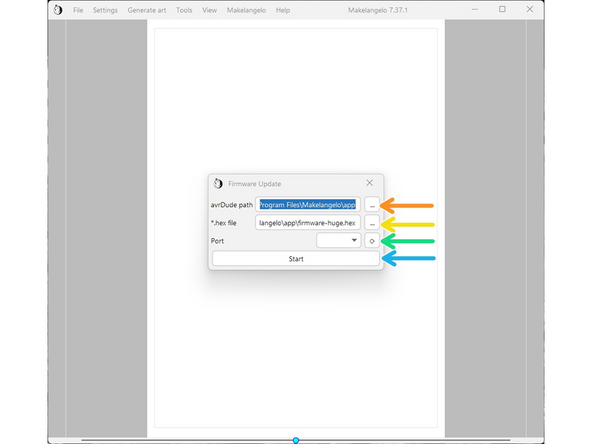
The update tool in File > Update firmware will help you to upload the new code to your robot.
-
Depending on your operating system, there may be extra steps.
-
-
-
In avrDude path, click the '...' and surf to C:\Program Files\Makelangelo\App
-
In *.hex file, do the same thing and then click on firmware-huge.hex
-
Connect the USB cable to the robot on the left side of the motherboard. Turn on power. Click the turning arrow button to the right of "port". A COM port should appear in the dropdown box.
-
Press Start. The application should take about 20 seconds to upload the firmware.
-
If it immediately says "finished", something has failed. Please contact us for more help.
-
After successful upload the LCD panel will probably say there is an EEPROM change. Accept the change.
-
Confirm the change has been applied. Click the dial, navigate to Configuration > Advanced Settings, and verify that Draw Min X is -683, Draw MinY is -1000, and Belt length is 2035.
-