Introduction
As of 2021 Makelangelo-firmware is now built and uploaded with PlatformIO. These instructions will show you how to build & upload from any windows-based device running VSCode.
-
-
-
-
Install Github Desktop (or your favorite flavor of git)
-
Clone the Makelangelo-firmware repository. I will clone to local directory ~/Makelangelo-firmware/
-
Click on the PlatformIO plugin
-
Click Quick Access PIO Home > Open
-
Click Open Project and then
-
Open your copy of folder ~/Makelangelo-firmware/
-
-
-
Click on "Explorer"
-
Click on "Switch PlatformIO Environment"
-
Choose your environment. The first part of each name should be the board type. The second part of each name is the CNC style.
-
Compile your code to make sure there are no errors.
-
If your board allows and is connected, upload your code.
-
If your board communicates over serial USB, connect here.
-
-
-
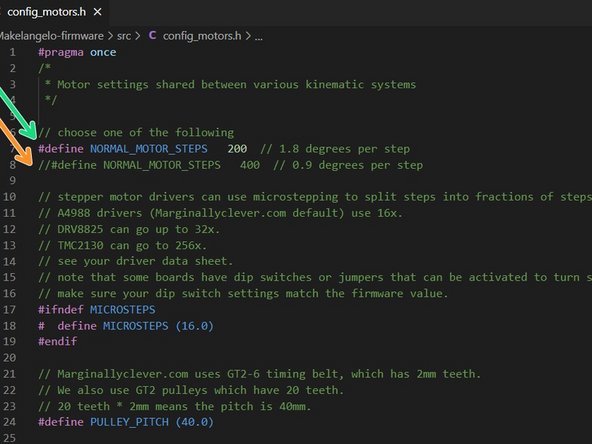
Early Makelangelo robots had 400 steps-per-turn on each motor, or 0.9 degrees per step.
-
Newer models have 200 steps, or 1.8 degrees per step.
-
in configure_motors.h you may need to tell the machine which kind of motors you have. the line starting with // is ignored and will have no effect.
-
In this example, the code is set for 200 step motors.
-
Once this is set correctly, upload the firmware again.
-
-
-
Some boards must be updated by copying firmware to an SD card. If you're reading this, come to Discord and tell me to finish this section.
-